
Ask Claude for keyword research ideas with search volumes and it will hand you numbers that look real and are completely made up. That is the first thing to learn about how to use Claude for keyword research: the model has no live search data, and it will fill the gap with confident guesses unless you take that job away from it.
Most people stop there and call Claude useless for keyword work. That is the wrong conclusion. The data part was never the hard part of keyword research. The hard part is sorting 800 exported rows into intent groups, spotting the gaps, and deciding what to write first.
That sorting work is where Claude beats every tool I pay for.
To use Claude for keyword research, export real keyword data from SEMrush, Ahrefs, or Google Search Console, then feed the CSV to Claude. Claude clusters the keywords by intent, groups them into topic clusters, flags low difficulty gaps, and maps each group to a page. The numbers come from your tool. The thinking comes from Claude.
Can Claude Do Keyword Research On Its Own?
No. Claude cannot pull search volume, keyword difficulty, or CPC, and it should never be trusted to estimate them. Any volume figure Claude produces without your data attached is fiction.
What it can do alone is expand seeds. Give it one topic and your audience, and it will generate question keywords and long-tail angles that keyword tools miss because nobody has searched them at scale yet.
We treat those as hypotheses. They go into SEMrush for validation before anything gets written.
Setup I Build Before Prompting Anything In Claude
The quality of the output is decided before the first prompt. A bare chat gets you generic clusters. A prepared workspace gets you clusters that match your actual site.
I run this inside a Claude Project, and the project knowledge holds four things:
- The site’s niche and who it sells to, in two paragraphs
- A list of every published URL with its target keyword
- The competitors we actually lose to, not the aspirational ones
- Rules for what counts as winnable (for us, KD under 25 and volume above 50)
That last file matters most. Without it, Claude will recommend head terms your domain cannot touch for two years.
Fifteen minutes of setup, reused across every keyword session after that.
How To Use Claude for Keyword Research, Step By Step
This is the exact sequence I run for client accounts and for my own site. Nothing here needs API access or a paid connector.
- Export the raw list. SEMrush Keyword Magic for a seed term, filtered to KD under 30. Download as CSV, usually 500 to 1,500 rows.
- Export GSC queries for the last 90 days if the site is live. This shows what Google already associates with the domain, which is your fastest ranking path.
- Paste or upload both files into the project chat. One chat per seed topic, never five topics in one thread.
- Ask Claude to cluster by search intent first, topic second. Intent first is the order that matters. Two keywords with the same words can need different pages.
- Ask for a priority table: cluster, primary keyword, supporting keywords, difficulty from the CSV, suggested page type, and what already ranks in the niche.
- Challenge the output once. I ask “which of these clusters would you cut and why”. The cuts are usually right and the reasoning catches things I missed.
The first time we ran this on a live client export, step 6 killed four clusters we were about to brief writers on. All four targeted queries the client’s product could not honestly satisfy. A keyword tool will never tell you that. Claude did, because the project knowledge described what the product does.
Best Claude Model for Keyword Research
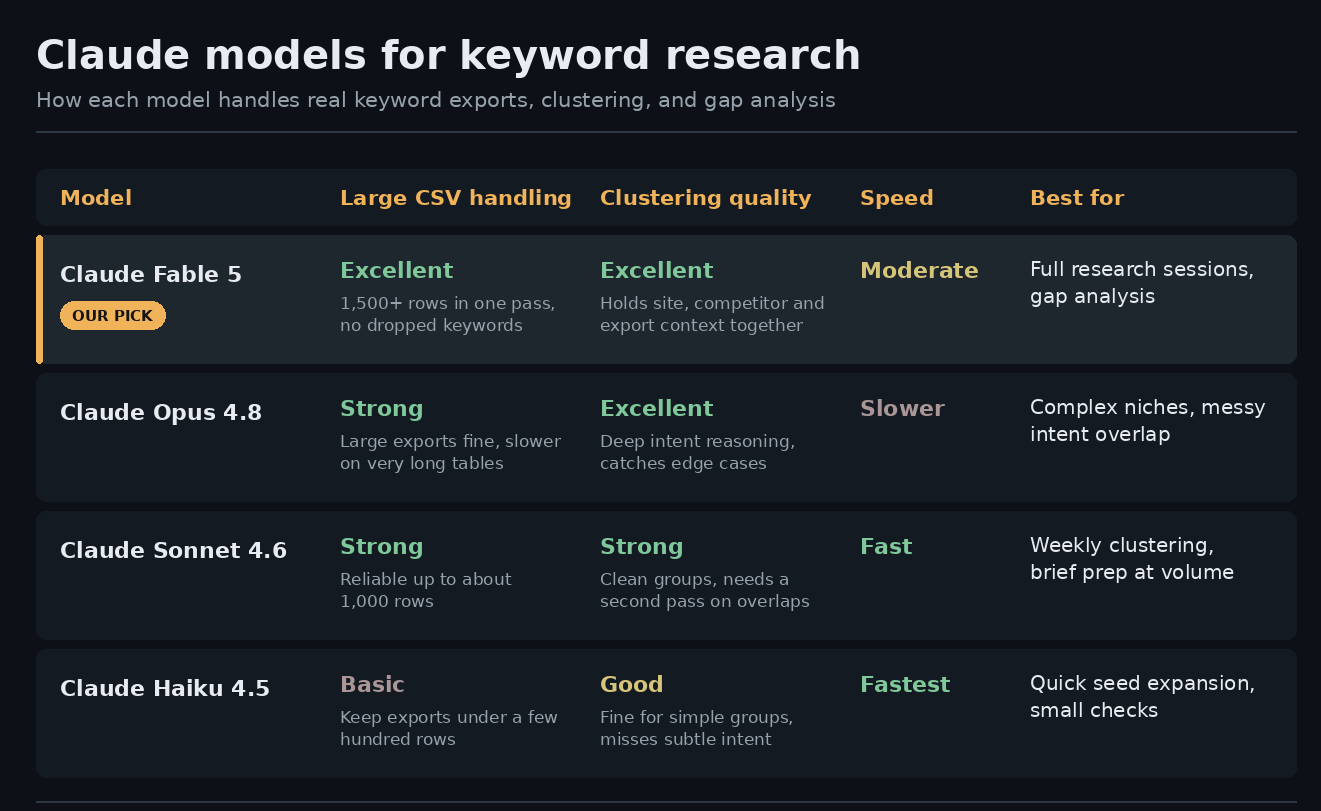
We have run this workflow across four Claude models on the same client exports, and the differences show up in exactly two places: how large an export the model holds without dropping rows, and how well it reads intent when two keywords look identical but need different pages.
Claude Fable 5 is the one we use now. It is the first model that takes a 1,500 row SEMrush export, the site’s full URL list, and a competitor list in a single conversation and keeps all three straight through the gap analysis step. Before Fable 5, we split large exports into batches and stitched the clusters back together by hand, which was the most annoying part of the whole process.
If cost or speed matters more than depth, Sonnet 4.6 covers most weekly clustering work without complaint. Haiku 4.5 is only for quick seed expansion. It groups fast but reads intent shallowly, and shallow intent grouping is how cannibalization problems start.
Clustering Prompt That Does The Heavy Lifting
Clustering is the step people get wrong, so here is the prompt shape that works. Short version: give Claude the grouping rules instead of letting it invent them.
Mine reads close to this: “Cluster these keywords by intent (informational, comparison, transactional, navigational). Within each intent, group by topic. One primary keyword per group, chosen by highest volume in the CSV. Flag any keyword that could belong to two groups instead of forcing it into one.”
That last line saves real cleanup time. Forced keywords create cannibalization later, where two of your pages fight for the same query.
One honest annoyance: on exports past a thousand rows, older models would quietly drop keywords mid-list. Always ask Claude to count the input rows and output rows and confirm they match. Cheap check, catches a silent failure.
Finding Low Difficulty Gaps With Fable 5
We moved this workflow to Claude Fable 5 when it released, and gap analysis is where the upgrade shows. The model holds the full export, the site’s URL list, and the competitor list in one pass without losing the thread.
The gap prompt is simple. “Compare the keyword clusters against my published URLs. List clusters where I have no page, sorted by lowest difficulty first. For each, tell me why a new site has a realistic shot.”
Three types of gaps come back worth acting on:
- Question keywords where forums hold the top spots
- Task-level long-tails the big sites skipped
- Clusters where every ranking page is more than a year old
Anything outside those three goes to a someday list. New domains win on soft SERPs, and Claude is good at reading softness when you paste the actual top ten results in for a second opinion.
Claude for SEO Workflow
Keyword research is the front of the pipeline, not the whole pipeline. In our Claude for SEO setup, the priority table from step 5 feeds directly into content briefs in the same project, so the brief inherits the cluster, the intent label, and the internal link targets without re-explaining anything.
That handoff is the quiet advantage. Tools give you a spreadsheet and walk away. Claude remembers why a keyword made the list when it is time to write for it.
One caution to end on. Claude will happily produce a beautiful priority table from garbage input. If the export was scraped from the wrong country database or an unfiltered seed, the clusters will be neat and useless. Check the CSV before the prompt, every time. The model organizes your thinking. It cannot fix your data.
FAQ’s
Can Claude replace SEMrush or Ahrefs for keyword research?
No. Claude has no search volume or difficulty data. It replaces the manual sorting, clustering, and prioritization you do after exporting from those tools.
What is the best Claude model for keyword research?
Claude Fable 5, the current model. It handles large CSV exports in one pass and holds site context, competitor lists, and the full keyword set together without dropping rows.
How many keywords can I give Claude at once?
Exports of 500 to 1,500 rows work well in a single chat. Ask Claude to confirm the row count it received so nothing gets silently dropped.

SEO and digital marketing specialist. I also write about jobs abroad, relocating overseas, and learning languages. MBA in Marketing.