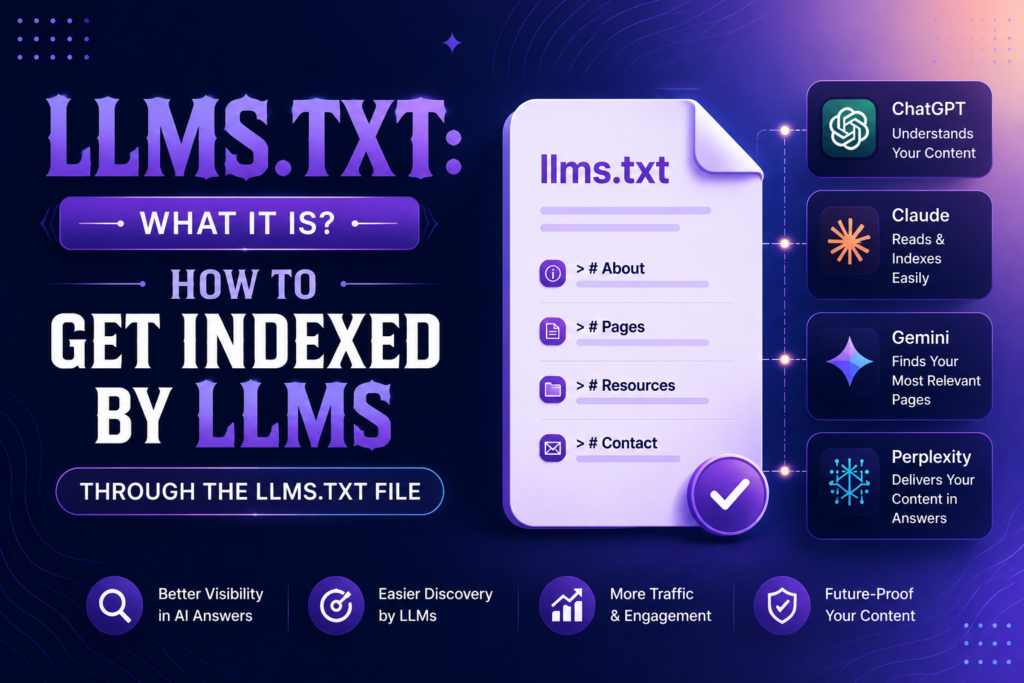
Ask five SEO’s what llms.txt does and you will get five different answers. Half of them will tell you it is the new robots.txt for AI. It is not, and treating it that way is how sites end up with a file that does nothing. If you have been searching “llms.txt what is it” and getting recycled definitions, this is the practical version, written after adding the file to real client sites and watching what actually happened.
The short version: llms.txt is a markdown file that sits at your site root and hands AI models a clean, curated map of your most useful content. That is the whole idea. The interesting part is what you put in it, and what you should expect from it.
llms.txt is a proposed standard (from Jeremy Howard of Answer.AI, September 2024) for a markdown file placed at yourdomain.com/llms.txt. It lists your site’s key pages with short descriptions so large language models can find and understand your best content without parsing heavy HTML. It does not block or force indexing. It is an invitation, not a directive.
What is llms.txt, in plain terms
Think of it as a table of contents written for machines that read like humans. Robots.txt tells crawlers what to avoid. Sitemaps dump every URL you have. llms.txt does neither. It says “here is what matters on this site, and here is why.”
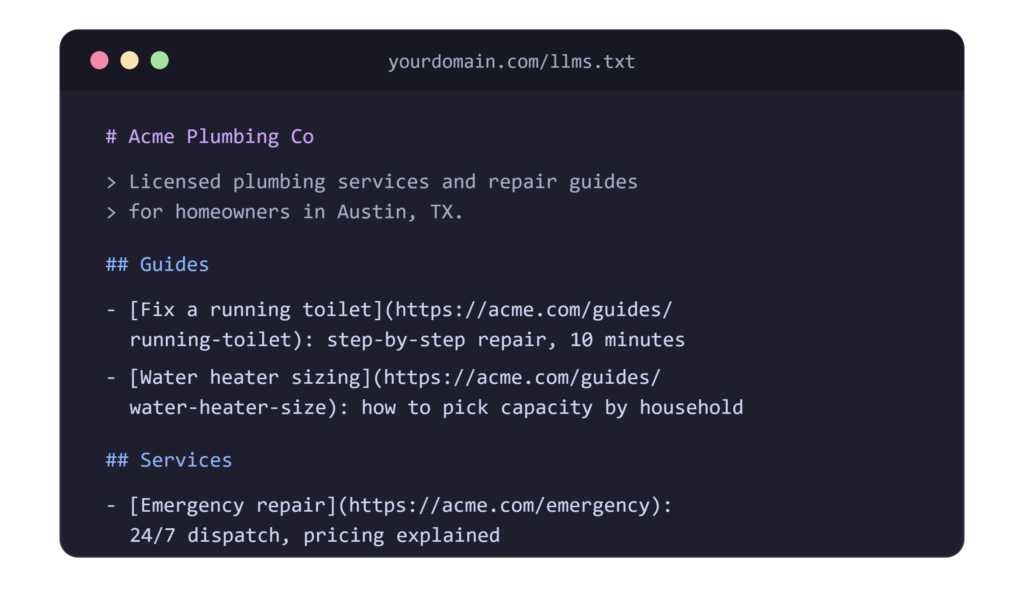
The format is deliberately simple. An H1 with your site name, a blockquote summary, then H2 sections containing markdown links with one-line descriptions.
A minimal llms.txt file example:
There is also an optional companion, llms-full.txt, which contains the full text of your key pages in one markdown file. Documentation-heavy sites benefit most from that one.
Why Would Someone Need an llms.txt file?
Honest answer: right now, the case is speculative but cheap to make. No major AI company has confirmed it uses llms.txt for retrieval or training. Google’s John Mueller compared it to the keywords meta tag. That is the skeptical position, and it is fair.
Here is the other side, from our own setup. We added llms.txt to a SaaS client’s docs site last year mostly as an experiment. Within weeks we started seeing hits to the file in server logs from AI-adjacent user agents. Referrals from AI assistants did not spike, so we are not claiming a ranking miracle. What we got was cleaner: when we tested product questions in ChatGPT and Perplexity, answers started matching our docs phrasing more closely for pages listed in the file.
Correlation, not proof. But the file took forty minutes to build. At that cost, we ship it on every site now.
The stronger reason is where things are heading. AI assistants increasingly answer questions directly, and they pull from sources they can parse fast. A markdown file with your best content pre-selected removes friction. You are betting a small amount of effort on a plausible future.
llms.txt vs robots.txt vs sitemap.xml, What Each One Does?
(keep the existing intro paragraphs, then place this table after “llms.txt is a recommendation” paragraph)
| robots.txt | sitemap.xml | llms.txt | |
| Job | Controls crawler access | Lists URLs for discovery | Curates key content for AI models |
| Format | Plain text directives | XML | Markdown |
| Location | Site root | Site root or declared in robots.txt | Site root |
| Audience | Search and AI crawlers | Search engines | Large language models |
| Enforcement | Obeyed by compliant bots | None, discovery only | None, informational only |
| Official standard | Yes, since 1994 | Yes, sitemaps.org protocol | Proposed, not yet adopted officially |
| Typical size | A few lines | Every indexable URL | 15 to 40 curated links |
| Update frequency | Rarely | Automatic via CMS | When cornerstone content changes |
The table makes the pattern obvious. One file blocks, one file lists, one file explains. No overlap, no replacement.
Common llms.txt Mistakes That Waste The Effort
Most llms.txt files we review in audits fail for the same handful of reasons, and none of them are technical.
The biggest one is dumping the sitemap into markdown. Two hundred links with no descriptions is not curation. A model gains nothing from a list it could have pulled from sitemap.xml anyway.
Second is stale content. Teams generate the file once, forget it, and six months later half the links 404 or point to renamed pages. Dead links in a file meant to build trust with AI systems is a bad look. Set a quarterly reminder, or hook the file into your publishing checklist.
Third, vague descriptions. “Our blog” tells a model nothing. “Weekly teardowns of SaaS pricing pages with real conversion data” gives it something to match against a user’s question.
A few smaller ones worth checking:
- serving the file with an HTML content type instead of plain text
- listing gated or paywalled pages a model cannot read
- forgetting the blockquote summary at the top
- writing descriptions in marketing speak instead of plain answers
One last check before you publish. Open the file, read only the descriptions, and ask if a stranger could understand what your site does. If yes, the file is doing its job. If not, rewrite until it does.
This adds roughly 350 words across the table section and the mistakes section, and picks up “llms.txt mistakes”, “llms.txt vs robots.txt”, and “sitemap” as natural keyword coverage.
Does llms.txt Go On The Site Root or Somewhere Else?
Site root. Always. The file must live at yourdomain.com/llms.txt, the same way robots.txt does. Not in a subfolder, not behind a login, not blocked by your own robots.txt rules.
Serve it as plain text with UTF-8 encoding. If your CMS forces .txt files through a template or redirects them, fix that first. The first time we deployed one on a WordPress client, a security plugin was silently 403-ing the file for non-browser user agents. Check your logs after you publish.
How To Create Your llms.txt File, Step by Step
You can write it by hand in ten minutes for a small site. For bigger ones, here is the process we run:
- Pull your top pages by organic traffic and conversions from GA4 and Search Console. You want the 15 to 40 URLs that actually earn their keep.
- Group them into logical H2 sections. Guides, product pages, pricing, docs, whatever fits your site.
- Write a one-line description for each link. Be specific. “Complete pricing breakdown with plan comparison” beats “our pricing page.”
- Write the blockquote summary at the top. One or two sentences on what the site is and who it serves.
- Save as llms.txt, upload to root, then open yourdomain.com/llms.txt in a browser and confirm it renders as raw markdown.
If you want to skip manual work, an llms.txt generator can draft it. Firecrawl’s generator, Writesonic’s tool, and WordPress plugins like Yoast (which added support) or the dedicated “Website LLMs.txt” plugin all work. Shopify apps exist too for stores. We still edit generator output by hand every time, because generators grab everything and the whole point is curation.
llms.txt Best Practices We Follow on Client Sites
A few things that separate a useful file from a dead one:
- curate hard, 20 great links beat 200 mediocre ones
- descriptions matter more than the links themselves
- update it when you publish or retire cornerstone content
- keep URLs absolute, never relative
- skip thin pages, tag archives, and anything you would not want quoted
One more that surprised us: write descriptions the way a user would ask the question. Models match on meaning. “How to migrate from Universal Analytics to GA4 without losing history” gives a model something to grab. “GA4 migration guide” gives it less.
llms.txt For an Online Store
Ecommerce needs a different shape. Do not list ten thousand product URLs. List your category pages, your buying guides, your shipping and returns policies, and your best-selling product pages with descriptions that include price range and key specs.
Why the policy pages? Because that is what shoppers ask assistants. “Does this store ship to Canada” and “what is their return window” are exactly the queries where an AI either finds your answer or invents one. Give it the real answer to cite.
Shopify stores can use apps that auto-generate the file from collections. Edit the output. Trim it to what a helpful salesperson would actually mention.
How To See The llms.txt File of any Website
Type the domain followed by /llms.txt in your browser. That is it. Try anthropic.com/llms.txt or docs.perplexity.ai/llms.txt to see live examples from companies that have adopted it. Directories like llmstxt.site also track sites using the standard.
Steal structure from the good ones. The best files read like a well-organized reading list, not a sitemap dump.
Where llms.txt fits in your AI visibility work
The file is not a strategy on its own. It is one line item in a bigger checklist, and the pages it links to do the heavy lifting.
Before you publish yours, run the site through a proper GEO audit checklist. No point handing AI models a curated list of pages that are not extractable, have no schema, or answer nothing cleanly. Fix the pages first, then list them.
Deciding which pages earn a spot in the file is a research problem, not a guess. We use Claude for keyword research to map which questions our clients’ pages actually answer, then those question-holding pages go into llms.txt with descriptions written to match.
After the file is live, test it the way a user would. Ask the same product question in different assistants and watch which sources get pulled. Our ChatGPT vs Perplexity vs Claude comparison for SEO covers how each engine retrieves and cites differently, which changes what you should expect from the file on each one.
The sequence matters. Audit, then curate, then publish, then test. Sites that skip straight to publishing the file are decorating pages nobody can quote.
How To actually Get indexed by llms Through the llms.txt file
Set expectations straight: the file alone does not get you indexed anywhere. What it does is make your content easier to use once a model or its retrieval system reaches your site. Pair it with these and you cover the real ranking factors for AI visibility:
- do not block GPTBot, ClaudeBot, or PerplexityBot in robots.txt unless you mean to
- keep your content quotable, with clear standalone statements
- maintain fast, clean HTML, since most retrieval still parses your actual pages
- build the citations and mentions that models weight as authority
The file is one small signal in a larger AEO setup. Treat it that way and you will not be disappointed.
FAQ’s
What is llms.txt and should I add it to my site?
It is a markdown file at your site root listing your key pages for AI models. Yes, add it. The cost is under an hour and the downside is zero.
Does llms.txt replace robots.txt or my sitemap?
No. Robots.txt controls crawler access and sitemaps list URLs for search engines. llms.txt is a curated guide for AI models and works alongside both.
Do AI companies actually read llms.txt today?
None have officially confirmed it. Some crawlers do fetch the file, based on server logs we have reviewed. Adoption is a bet on the near future, not a guarantee.

SEO and digital marketing specialist. I also write about jobs abroad, relocating overseas, and learning languages. MBA in Marketing.